
In the digital age, gifts have taken on a new form, transcending traditional tangible items. With the rise of smartphones and the ever-expanding world of apps, giving an iPhone app as a gift has become a thoughtful and modern way to express your appreciation or celebrate a special occasion. Whether it’s a productivity tool, an entertaining game, or a utility app, this gesture can make for a unique and personalized present. In this article, we’ll explore the steps to give an iPhone app as a gift.
Step 1: Find the app in the iPhone App Store
The first step is to select an app that suits the recipient’s interests and needs. Consider their hobbies, preferences, or any challenges they might be facing that an app could help with. Whether it’s a fitness app for a health-conscious friend or a language learning app for someone looking to pick up a new skill, a well-chosen app reflects your thoughtfulness.
Launch the App Store on your iPhone, where you can browse apps or use Search to find the right app.
Step 2: Tap the share button and select “Gift App…”
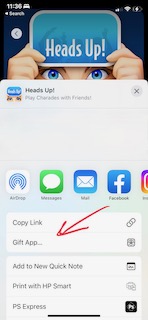
Once you’ve found the perfect app, tap the Share button (the square with the upward-facing arrow). Then, tap Gift App…

Step 3: Enter the recipient’s email address and a message
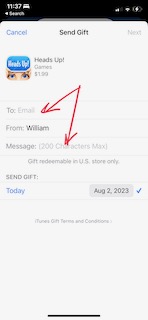
On the next screen, add the recipient’s email address and a message. Keep it short, as you can only use up to 200 characters in this field.
Step 4: Select a gift card design
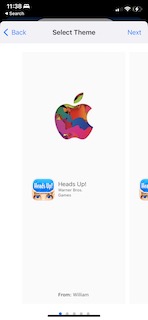
Swipe through the different gift card design options, then tap Next once you’ve found the one you’d like to use.
Step 5: Confirm the gift details, then click Buy
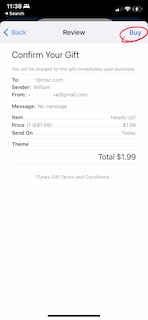
On the last screen, review the purchase details, then click Buy. Depending on your settings, you may be asked to enter your Apple ID password.
Conclusion:
In a world dominated by technology, giving an iPhone app as a gift is a modern and considerate gesture. It showcases your attention to the recipient’s interests and needs while also reflecting the evolving nature of gift-giving. By following the steps outlined in this article and adding your personal touch, you can make the experience of giving an iPhone app memorable and meaningful.
Check Daily Tech Tip’s Gift Guides for more ideas.